Agent-Ready APIs: Architecture for Pre-Made AI Systems
How to design APIs and reusable building blocks that AI agents can call safely: task-shaped endpoints, idempotency, MCP wrappers and a build-or-configure rule.
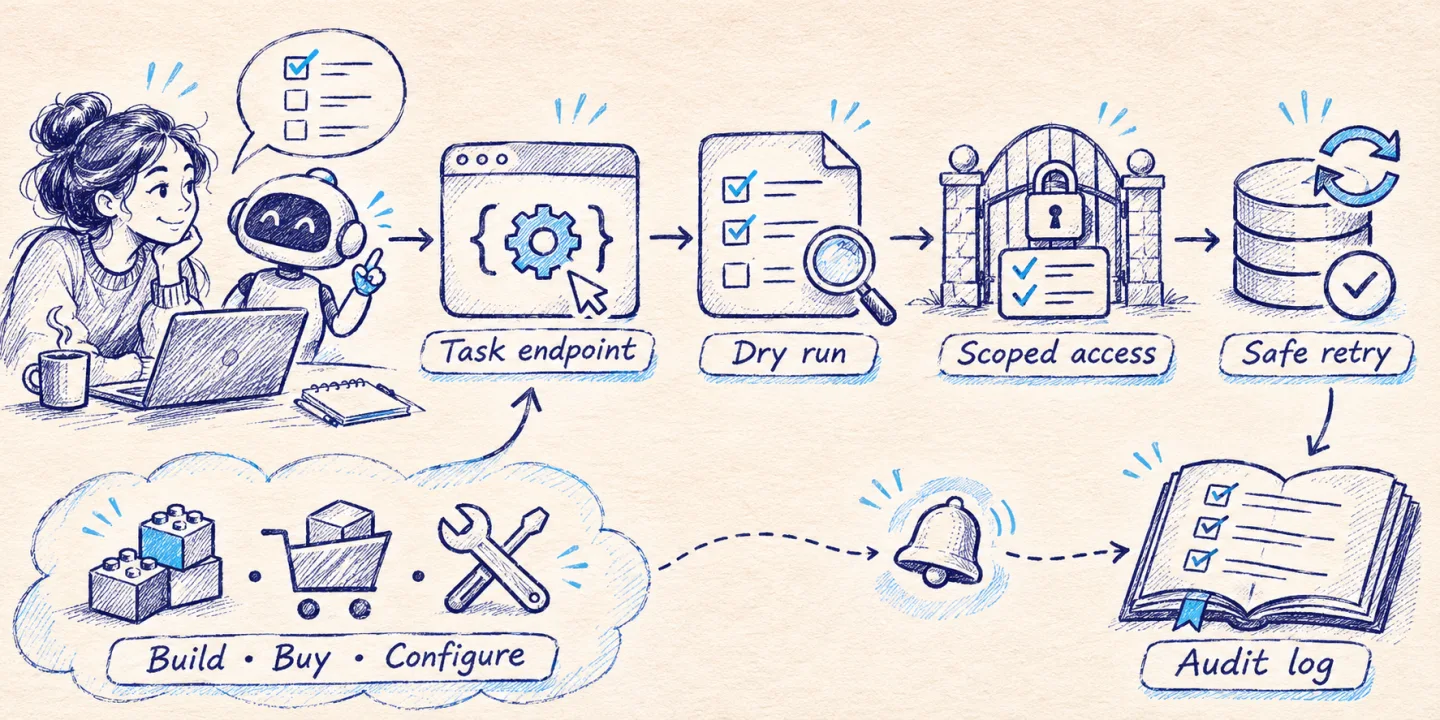
Most internal APIs were written for a frontend team that reads the docs once, hard-codes the call sequence and never deviates from it. An AI agent does the opposite: it reads the description on every run, picks the call sequence itself and retries when something looks wrong. APIs that work fine for the first kind of client fail in predictable ways with the second. This article covers what to change in the API so an agent can use it without breaking things, how to expose it (MCP server or OpenAPI), and why I package the recurring parts as pre-configured modules instead of rebuilding them for every client.
Key takeaways
- Agents fail on ambiguity, not on complexity. Clear names, bounded responses and explicit errors matter more than clever endpoints.
- Design endpoints around tasks (“find the customer’s open orders”), not around tables.
- Every operation with a side effect needs an idempotency key, a dry-run mode and an audit record.
- An MCP server is a thin, opinionated layer on top of your API. It is not a second backend.
- The parts that repeat across projects (auth, ingestion, retrieval, tool gateway, evaluation) are worth building once and configuring per client.
Why agents struggle with ordinary APIs
Four problems come up in almost every integration I review.
Ambiguous names. GET /items, POST /process, a field called status with eleven undocumented values. A developer asks a colleague. A model guesses, and the guess is plausible enough to pass review.
Chatty sequences. To answer “what did this customer order last month” the client has to call /customers?email=, then /customers/{id}/orders, then /orders/{id}/lines for each order. Every hop is a chance to pick the wrong ID, and every intermediate response travels through the model’s context. I covered the cost of that in MCP tool calls vs. code execution.
Unbounded responses. An endpoint that returns 4,000 rows by default is a nuisance for a frontend and a real failure for an agent: the response either gets truncated silently or pushes the useful part of the conversation out of the window.
Unsafe retries. Agents retry. Networks fail between the request and the response. If POST /refunds is not idempotent, sooner or later a customer is refunded twice.
None of these are AI problems. They are API design debt that human clients learned to work around.
Seven principles for an agent-ready API
1. Shape endpoints around tasks
Offer the operation the caller actually wants. One call that takes an email and a date range and returns orders with their lines beats three calls the agent has to chain. Keep the low-level resources for other clients; add the task-level operation next to them.
2. Bound every response
Paginate by default with a small page size, return a cursor, and let the caller choose fields. Include a total count so the agent can decide whether to continue or to narrow the query. A response that says “showing 20 of 3,812, refine by date or status” gets better behaviour than one that dumps everything.
3. Make writes idempotent
Accept an idempotency key on every operation that changes state and return the original result when the same key arrives again. This is the single most valuable change for agent safety, and it is useful for every other client too.
4. Return errors a model can act on
A 400 with {"error": "invalid"} produces a retry with the same payload. An error that names the field, the rule and a valid example produces a corrected call. Use a stable machine-readable code plus one plain sentence.
5. Offer a dry run
For anything expensive or irreversible, support a mode that validates the request and returns what would happen: the amount, the affected records, the emails that would be sent. The agent shows that preview to a person, and the real call happens only after approval.
6. Scope credentials to the job
The agent’s token should be able to do what the workflow needs and nothing else. A support assistant can read orders and create a return request; it cannot change prices. Scopes are the last line of defence when a prompt goes wrong.
7. Log who asked, not just who called
Record the end user on whose behalf the agent acted, the tool that was invoked, the arguments and the outcome. When someone asks “why did the system cancel this order”, you need an answer that does not depend on reading a model transcript.
Before and after: one tool definition
Here is a tool as it often comes out of an automatic OpenAPI conversion:
{
  "name": "post_orders_id_actions",
  "description": "Perform action on order",
  "inputSchema": {
    "type": "object",
    "properties": {
      "id": { "type": "string" },
      "action": { "type": "string" },
      "data": { "type": "object" }
    },
    "required": ["id", "action"]
  }
}
The model has to guess which actions exist, what data contains and whether calling it twice is safe. The redesigned version:
{
  "name": "cancel_order",
  "description": "Cancel an order that has not shipped yet. Returns the refund amount. Fails with ORDER_ALREADY_SHIPPED if the parcel has left the warehouse; in that case use create_return_request instead.",
  "inputSchema": {
    "type": "object",
    "properties": {
      "order_number": {
        "type": "string",
        "description": "Public order number as shown to the customer, e.g. ZZ-10482"
      },
      "reason": {
        "type": "string",
        "enum": ["customer_request", "duplicate", "payment_issue"]
      },
      "dry_run": {
        "type": "boolean",
        "description": "If true, validate and return the refund preview without cancelling",
        "default": true
      },
      "idempotency_key": { "type": "string" }
    },
    "required": ["order_number", "reason", "idempotency_key"]
  },
  "annotations": { "destructiveHint": true, "idempotentHint": true }
}
One verb, one job. The description states the precondition, the failure code and the alternative. The identifier is the one a customer actually has. dry_run defaults to the safe value. The annotations are hints defined by the Model Context Protocol; clients can use them to decide when to ask for confirmation, but they are hints, so the server still has to enforce the rules itself.
MCP server or OpenAPI?
Both describe operations to a model. They differ in who does the adapting.
| Expose OpenAPI directly | Wrap in an MCP server | |
|---|---|---|
| Effort | Low if the spec exists and is accurate | A small service to write and run |
| Tool quality | One tool per endpoint, named after routes | Curated tools named after tasks |
| Auth | Whatever the API already has | Can add per-user scoping and approval steps |
| Works with | Clients that import OpenAPI | Any MCP-capable client |
| Best when | The API is already task-shaped | The API is resource-shaped or too large |
My rule: if the API was designed for third-party developers and has good descriptions, start from the OpenAPI spec. If it grew organically inside the company, write a small MCP server that exposes ten to twenty well-described tools and keeps everything else out of sight. Converting a 300-endpoint spec one-to-one into 300 tools gives the model a phone book and no idea whom to call.
The MCP server should stay thin: validation, mapping of friendly identifiers to internal IDs, response trimming, and the approval gate. Business rules stay in the backend where every other client relies on them.
Long-running work: events, not polling
Agents are bad at waiting. If an operation takes more than a few seconds (a report, a bulk import, a document batch), return a job ID immediately and deliver the result through a webhook or an event the orchestrator subscribes to. Give the agent a get_job_status tool for the cases where it does need to check, and make the status response say what to do next: wait, fetch the result, or report the failure.
The pre-configured approach
After enough of these projects the same components show up every time:
- Auth and tenancy: who the end user is, which data they may see, how the agent’s token is scoped.
- Ingestion: parsers and connectors that turn documents and records into something searchable.
- Retrieval: the search layer described in the private RAG reference architecture.
- Tool gateway: one place where tools are registered, validated, rate-limited, logged and gated behind approval.
- Evaluation harness: a fixed set of test conversations that runs before every change to prompts, tools or models.
None of these are specific to one client. What is specific: the data sources, the list of tools, the approval rules and the wording. So I keep the five modules as tested building blocks and spend the project time on configuration and on the tools that are unique to the business. That is what I mean by a pre-configured system: the architecture is done, the adaptation is not skipped.
Build, buy or configure
| Situation | Sensible choice |
|---|---|
| Standard process, data may live with a vendor, no integration with internal systems | Buy a SaaS product |
| Company data must stay on your infrastructure, process is common (document search, lead triage, order status) | Configure a pre-built architecture |
| The workflow is the competitive advantage, or it touches systems nobody else has | Build custom, reusing the generic modules |
| You do not yet know whether the use case works | Configure a small pilot first, decide after measuring |
The mistake I see most is building custom for a problem in the second row, and paying for months of infrastructure work that produces nothing a user can see.
Security: the parts that are easy to miss
Tool results are untrusted input. A support ticket, a web page or a PDF can contain text written to look like instructions. If the agent reads it and has a tool that sends email or changes data, that text can try to trigger the tool. Keep data and instructions separate in the prompt, never let content from a tool result authorise an action, and require human approval for side effects that matter.
The confused deputy. The agent often has broader access than the person talking to it. If a user asks for “all invoices” and the agent’s token can see every tenant, the filter has to be enforced by the server from the user’s identity, not by the model from the conversation.
Secrets stay out of the context. API keys belong in the tool gateway. The model sees tool names and results, never credentials. The same goes for personal data the task does not need: trim it in the wrapper, before it reaches the model.
Approval is a product feature. Decide per tool: runs freely, runs with a preview, or needs a named approver. Write that table down with the business owner. It is the document people will ask for after the first incident.
A two-week first version
For an existing API, a realistic first iteration looks like this:
- Days 1–2: pick one workflow, list the five to ten operations it needs, mark each as read or write.
- Days 3–6: add missing task-level endpoints, idempotency keys and dry-run support for the writes.
- Days 7–9: thin MCP server with curated tools, scoped token, audit logging.
- Days 10–12: evaluation set of 30–50 realistic requests, including hostile ones; fix descriptions until the agent picks the right tool consistently.
- Days 13–14: pilot with a few internal users, approval on every write.
The durations are a planning template, not a promise; an undocumented legacy API or a slow security review will stretch them.
How I work on this with clients
I usually start with a short audit of the API from an agent’s point of view: which operations are safe to expose now, which need idempotency or a dry run first, and where a thin MCP layer saves a redesign. From there it is either a fixed-scope delivery of the tool layer or a longer engagement where I own the architecture alongside your team. If the next step is a customer-facing assistant, the same tool layer feeds directly into the bot architecture I describe separately.
If you have an API and a workflow in mind, tell me about it and I will come back with a concrete plan. The ready-made components are listed under AI solutions.